














Troubleshooting and FAQ
Most questions have a quick answer. Start with the item that matches what you see; if it is not here, your support contact is in the next chapter.
If something does not look right
| What you see | What to check |
|---|---|
| The buttons do not appear on the cart | Check Show the block in under General matches your theme, then clear the cache. On a custom theme, choose the custom hook and add the tag (Theme integration). |
| No email arrives after a save | Your shop must be able to send email. Test it under Advanced Parameters › E-mail. The share email goes to the address the shopper entered. |
| No reminder email goes out | Both Enable cart expiration and Send an expiry reminder email must be on, and the scheduled job must be running (The scheduled cleanup (CRON)). |
| Expired baskets are not cleared | Cart expiration clears baskets only through the scheduled job. Set up the daily cron URL (The scheduled cleanup (CRON)). |
| The dashboard figures are empty | They fill in as shoppers save and share baskets. If the Statistics screen says the table is missing, use Reset once (The Module Manager actions). |
| A link opens straight to the cart, with no landing page | Turn on Show a landing page when a link is opened under General › Shared-basket page (Shared-basket page). |
| A product is missing after a basket is brought back | Products that are now out of stock, disabled or deleted are skipped on purpose; the rest of the basket still comes back (Keep or replace). |
Frequently asked questions
Does a shopper have to create an account to save a basket?
No. Anyone can save a basket and get a code or a link. Signed-in customers also get the My Saved Carts page (The customer's saved baskets).
How long is a basket kept?
Forever, unless you turn on cart expiration and choose a period, after which old baskets are cleared by the daily job (Cart expiration and the cleanup job).
Is anything sent to a third party?
No. The QR code and the dashboard chart are produced inside your shop. The share buttons open the shopper's own apps and networks; your shop sends nothing to them.
Can I change the look of the buttons and the popup?
Yes, under General › Button style and Popup appearance (Button style).
Will it work with my theme?
It works with Classic and Hummingbird out of the box, and with any theme after a small change (Theme integration).
The Our modules page
The last entry in the menu, Our modules, is a quiet showcase of the other modules made by the team behind Saved Basket. It is there if you want it and never gets in the way.
What the page shows
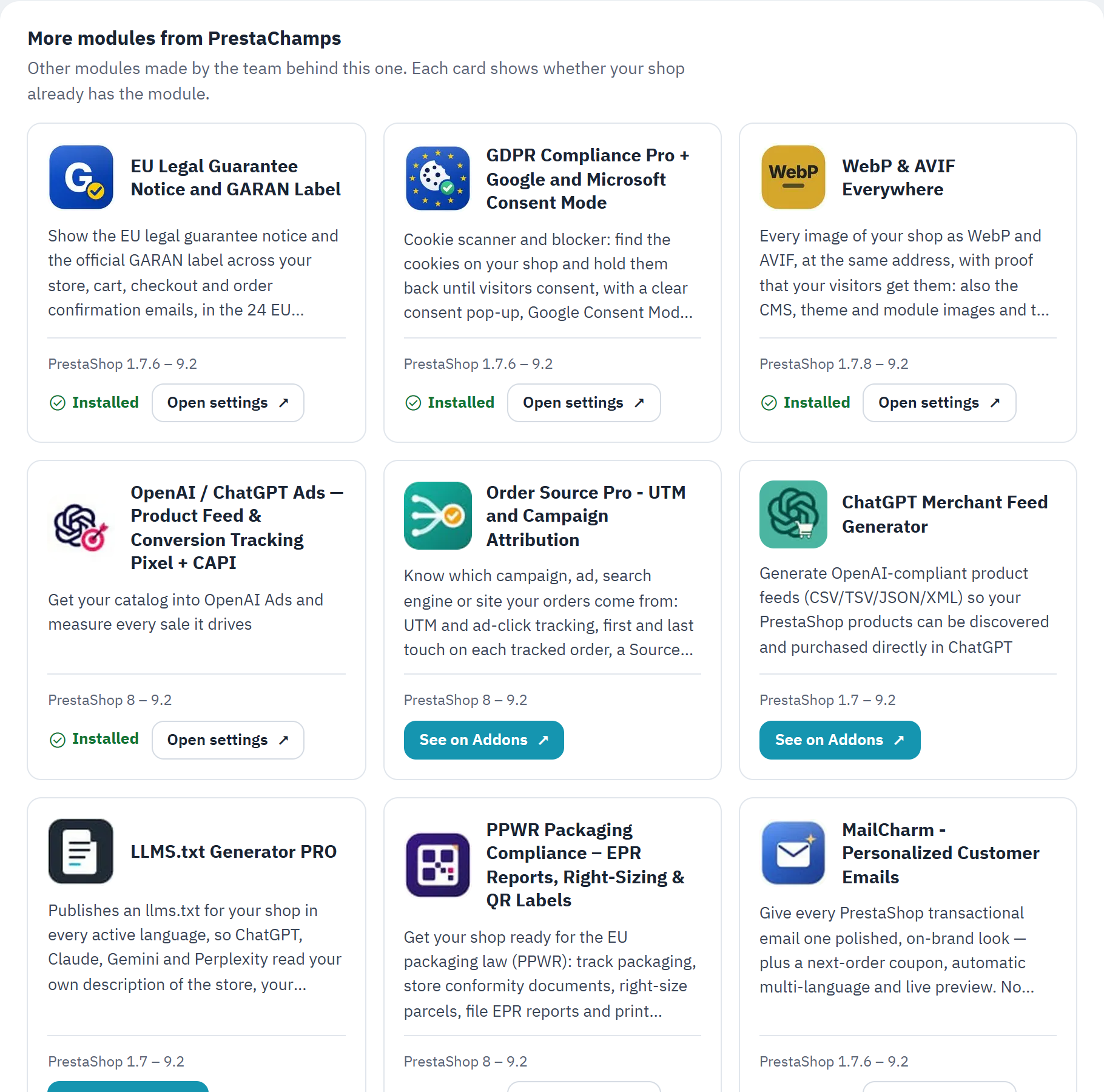
- One card per module, with its name, a one-line description and the PrestaShop versions it supports.
- A module you already have is marked Installed, with a link to open its settings.
- A module you do not have links to its page on PrestaShop Addons, in a new tab.
Each card tells you at a glance whether your shop already has that module. Nothing on this page is loaded from the internet and nothing is sent anywhere: the cards are built from a list that ships inside the module.
A note from the team
Under the cards there is a short, hand-written thank-you from the PrestaChamps team. That is all the page does: it is a friendly way to find the team's other work, not an advert that follows you around.
Support
If a question is not answered in this guide, the team behind Saved Basket is happy to help.
Get in touch
- Write to us on PrestaShop Addons, from the module's page. A real person reads every message.
- Email
leo@prestachamps.comwith your PrestaShop version, your theme and a short description of what you see. A screenshot helps a lot.
Before you write, it often helps to note your PrestaShop version (shown on the dashboard header and in the Module Manager), whether you are on the Classic, Hummingbird or a custom theme, and which screen or step the question is about.
More from the team
The Our modules screen lists the team's other PrestaShop modules and shows which ones your shop already has (The Our modules page). Thank you for choosing Saved Basket.